Lifestack
Last Updated on 8/16/2026
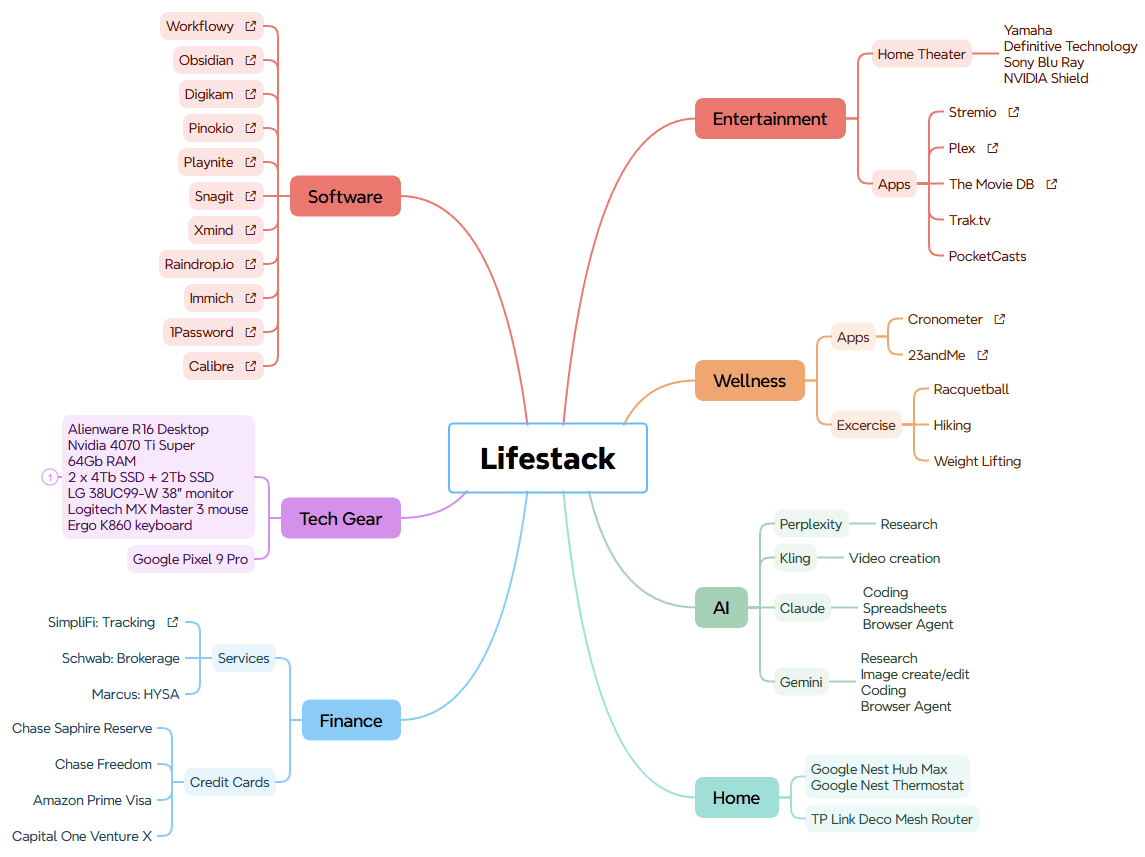
I came across the term “Lifestack” after stumbling on Jack Baty’s site. It’s a term to share all the hardware, software and tools I use for my life. I find that using a Mindmap is a great way to visualize it. This isn’t everything and is always evolving. I’ve included additional info for some items.
Note: I use affiliate links where possible and may benefit for a referral.
Explore other Lifestacks
Jack Baty
Paul Stmatiou
Chris Hutchins
Mathew Adams
Ron Guest
Jeff Su
Software, Apps and Services
- Workflowy for notes and tasks I use daily as a second brain. I use it as an outliner app for task management and storing various types of information I can access quickly and easily. It’s simplicity and flexibility is what continues to be the reason I’ve stuck to it. There are several other great options that offer similar functionality I’ve tried such as Notion, Obsidian, Roam and others. If you haven’t researched tools such as these I highly recommend you do so to see if such an app can be helpful for you.
- I’ve started to use Obsidian as a supplemental tool to Workflowy to store more permanent information. It adds additional functionality and stores all the data locally in the form of markdown files which gives me better ownership and should provide future functionality to integrate better with AI.
- 1Password is a critical utility for password management. Bitwarden is a great free and open source alternative.
- Raindrop.io – is my bookmarking service and acts as a supplement to my second brain for reference. I’m also considering using it as a read later catch all for all content I come across that I want to return to later for reading. I’m also intrigued by MyMind and have been testing it out as well.
- Pinokio – This is my launchpad for running AI apps on my local machine. There are tons of scripts that allow you to easily install and run apps with 1 click installations. More info on my AI page.
- Snagit – my screenshot and markup tool of choice. Also used for desktop video recording.
- Xmind – my favorite Mindmapping service
- Simplify – great for aggregating all accounts and transactions in one location. Also provides a good breakdown of income vs. expenses.
- Cronometer – best app I could find that provides several of the key features I was looking for including fitness and food tracking that includes net carb values. Offers both app and desktop interfaces and integrates with my Withings scale
- Plex – this is my media library server for streaming movies, tv shows, music along with personal photos and videos. I can also access the data remotely and create accounts for friends and family to access it. I’m currently evaluating Jellyfin as a possible replacement as well.
- DigiKam for managing photos on my PC. Features face recognition, tagging and organization tools. Google Photos for cloud availability. I’ve also recently installed Immich which is a Google Photos self server replacement I’m testing to supplement these. I loved Mylio but it’s only available as a pricey sub now.
- Calibre is an app I use to upload books and documents to my Kindle Paperwhite.
- The Movie DB is a web service for creating watchlists of all the movies or shows I want to watch. I also supplement it with JustWatch to provide which network(s) have the movie or show where you can stream it from for free or paid. I use Trak.tv to track a history of what I watch that can be shared.
- YouTube TV is my live broadcast streamer of choice. I think it offers the best combination of channels, features and price for my needs. The Streamable offers great TV streaming comparison features to help pick the right service for you.
- Playnite is a great app to aggregate all of the cloud gaming services. I can use it to display all the games I have as well as launch them from a single interface.
- PocketCasts app and web service for podcasts
- KCRW is a great station to discover new music and I discovered this Spotify playlist which adds music from their daily program rotations.
- Setlist.fm is what I use to to track every concert I attend along with their setlist and great stats.
- Dreamhost – This is where I host all my WordPress sites using the Blocksy. I also use Cloudflare for domains and DNS.
- Railway – just started using this to host my vibe coded projects
Newsletters / Podcasts
- Allthehacks (great tips for optimizing all parts of your life)
- Recommendo (weekly cool links to all types of stuff)
- Installer (weekly cool links to all types of stuff)
- AI for Humans (AI news broken down easily with a comedic spin)
- Ben’s Bites (Keep up with AI news)
Computer & Other Hardware
- Mobile: Pixel 9 Pro with Pixel Buds Pro 2
- PC: Alienware R16 Desktop computer i7 14700F, 64Gb RAM, NVIDIA 4070 Ti Super, 4Tb Samsung 990 Pro SSD
- KEF LS II LT Speakers
- LG 38UC99-W 38″ widescreen monitor
- Logitech MX Master 3 mouse and Ergo K860 keyboard
- Misc:
- Google Nest Hub Max primarily as a digital photo frame, Streaming music speaker and AI assistant.
Home Theater
- Sony 75X900E TV
- Yamaha RX-A770 Home theater receiver
- Definitive Technology (8040 series) 7.1 speaker setup (using an RSL Speedwoofer 10)
- NVIDIA Shield Pro using Android TV to stream all my personal media through Plex and for streaming services.